Introduction: A digital laboratory to simulate real-world challenges
Agent-Based Modeling (ABM) is a powerful simulation technique used to understand and predict complex behaviors and interactions within systems. In ABM:
Agent are individual people, each with motivations and resources.
Agent evolve within an environment (multiple countries), each being characterized by different conditions
Agent may decide to move or not based on factors like safety and opportunity, that reflects the conditions of the different countries.
When agent move, the conditions of the countries can be affected
By letting agent interact within a virtual environment, movement patterns can be predicted in order to design better interventions
Agent-based modeling for Forced Displacement
In the context of forced displacement, ABM can help us explore how individuals and groups make migration decisions based on various factors. This tutorial will guide you through the fundamental components needed to define an ABM simulation for forced displacement scenarios.
Minimum ingredients to define a simulation
- Agents
Agents represent individuals or entities that interact with their environment and each other. In our displacement model, agents are displaced persons whose behaviors are influenced by:
- Perceived Safety: The level of danger in their current location.
- Access to Resources: Availability of essentials like food, water, and shelter.
- Social Connections: Presence of family, friends, or social networks in potential destinations.
- Rules
The rules of behavior define how agents make decisions and behave. Each agent’s migration decision will depend on:
- Attributes: Age, health, skills, etc.
- Environmental Factors: Safety, resource availability, social networks in potential destinations.
- Environment
The environment is the context in which agents operate. It includes:
- Origin and Destination Locations: Characteristics of the home country and potential destinations (e.g., safety levels, resources, infrastructure).
- Iterations
Simulations run in loops or iterations, allowing agents to repeatedly act or interact over time, reflecting the ongoing nature of displacement scenarios.
Research Questions that can be Addressed by ABM
ABM can help answer critical questions such as:
Migration Destinations: Where are displaced populations most likely to migrate?
Influence of Push and Pull Factors: How do safety, resources, and social networks influence migration decisions?
Impact on Destinations: How will incoming populations affect resources and infrastructure in destination areas?
Impact on Origins: How will displacement impact the social and economic dynamics of the origin location?
There are therefore numerous added value of such modeling excercise compared to a simple predictive model:
Individual-Level Decisions: ABM captures the diversity and complexity of individual migration choices.
Emergent Outcomes: Observing system-level consequences of individual actions, identifying potential bottlenecks and unforeseen impacts.
Spatial Dynamics: Realistic representation of movement through space, considering geographical factors and travel costs.
A dummy Displacement Scenario
Imagine a political shock event disrupts Country A, causing some of its citizens to consider migrating to neighboring Countries B, C, and D. A simplified model can be build to simulate agents (individuals) deciding whether to move out of their origin country based on a combination of factors like:
- Living conditions in origin country (Country A): These worsen due to the political shock.
- Living conditions in destination countries (B, C, D): Each has varying degrees of attractiveness.
- Distance to destination countries: Closer destinations are more likely to be chosen.
To implement a simulation within such scenario, some data will be required:
Static Attributes: Age, gender, health status, skills, family size, risk tolerance.
Dynamic Attributes: Current location, satisfaction with current location, remaining resources.
-
Environment: Includes origin and potential destination locations with attributes like:
- Safety levels
- Availability of resources (food, water, shelter)
- Infrastructure capacity (education, health)
- Work Opportunity
- Presence of social networks
Modeling Steps
The goal is to calculate the number of agents remaining in the origin country (A) and those who migrated to countries B, C, and D under a series of assumptions both for the people and the environment (aka countries characteristics). Country characteristics can be measured by indexes measuring for instance Safety, Resources, Opportunities, existence of Citizen network from Country A and available Support Interventions (for instance “Resource Distribution” like Cash allowance, “Public services” like free access to School and Education or “Legal Documentation” to access formal labor employment)
To proceed, one needs to iterate over 5 steps:
- Define Agents
- Set up Initial Conditions
- Design the Model
- Simulate Displacement
- Analyze Results
We can do this with a few R libraries.
1/5. Define Agents
Agents representing citizens of Country A that have specific attributes.
Citizens in country A with for instance the following agent
characteristics:
- age: Random between 20 and 65. - health:
Random value from a normal distribution. - skills: “Low”,
“Medium”, or “High” (categorical). - family: True if the
agent has family (binary). - risk_tolerance: Random value
between 0 and 1 (uniform distribution). - social_network:
Boolean vector indicating connections only within country A (if family
is present).
# A class that extends the villager agent class to have skills, risk tolerance, and country history
person <- R6::R6Class("agent",
                         inherit = villager::agent,
                         public = list(
                           age = NULL,
                           alive = NULL,
                           children = NULL,
                           father_id = NULL,
                           first_name = NULL,
                           gender = NULL,
                           health = NULL,
                           identifier = NULL,
                           last_name = NULL,
                           mother_id = NULL,
                           partner = NULL,
                           profession = NULL,
                           skills = NULL,
                           risk_tolerance = NULL,
                           country_history = NULL,

                           initialize = function(identifier = NA,
                                                 first_name = NA,
                                                 last_name = NA,
                                                 age = 0,
                                                 mother_id = NA,
                                                 father_id = NA,
                                                 partner = NA,
                                                 children = vector(mode = "character"),
                                                 gender = NA,
                                                 profession = NA,
                                                 alive = TRUE,
                                                 health = 100,
                                                 skills = NA,
                                                 risk_tolerance = NA,
                                                 country_history = NA) {

                             # Call the base class with the standard values
                             super$initialize(identifier,
                                              first_name,
                                              last_name,
                                              age,
                                              mother_id,
                                              father_id,
                                              partner,
                                              children,
                                              gender,
                                              profession,
                                              alive,
                                              health)

                             # Set the extended class properties
                             self$skills <- skills
                             self$risk_tolerance <- risk_tolerance
                             self$country_history <- country_history
                           },

                           as_table = function() {
                             agent_table <- data.frame(
                               age = self$age,
                               alive = self$alive,
                               father_id = self$father_id,
                               first_name = self$first_name,
                               gender = self$gender,
                               health = self$health,
                               identifier = self$identifier,
                               last_name = self$last_name,
                               mother_id = self$mother_id,
                               partner = self$partner,
                               profession = self$profession,
                               skills = self$skills,
                               risk_tolerance = self$risk_tolerance,
                               country_history = paste(self$country_history, collapse = "-to-")
                             )
                             return(agent_table)
                           }
                         )
)
2/5. Set up Initial Conditions
Set up the environment with Country of origin A and destination
countries (destination_B, destination_C,
destination_D), aka the initial condition. Then a synthetic
Population is generated with 2000 agents for the conflict country
(origin_A) with the attributes defined above.
initial_condition <- function(current_state,
                              model_data,
                              agent_mgr,
                              resource_mgr) {
  # Create a normal distribution for health, centered around 80 (1 (nearly dead) to 100 (very healthy))
  health_norm <- rnorm(2000, mean=80 , sd=5)
  # Create a normal distribution for risk tolerance, centered around 60 (1 (tolerate risk) to 100 (do not support insecurity))
  risk_norm <- rnorm(2000, mean = 60, sd=15)
  # Create 2,000 people
  for(i in 1:2000) {
    # Assume two genders (female/male)
    gender = 'female'
    # Every even number we assign a male, getting a 50/50 gender split
    if((i %% 2) == 0) {
      gender = 'male'
    }
    # Get a number from the distribution and bound the value between 0 and 1
    # Bug: The distribution is picking values exclusively less than 0 and greater than 1
    # This is leading to the population having either 0 or 1 tolerance.
    risk <- round(risk_norm[i])
    risk <- pmin(risk, 1)
    risk <- pmax(risk, 0)
    new_person <- person$new(age=round(runif(1,7300,23725)),
                             gender=gender,
                             health=health_norm[i],
                             risk_tolerance=risk,
                             country_history=c("origin_A"))
    agent_mgr$add_agent(new_person)
  }

  # Randomly pair them, based on made up rules
  for (single_person in agent_mgr$get_living_agents()) {
    # Person has to be single
    if(is.na(single_person$partner)) {
      # Slim chance someone gets married
      if (runif(1,0,10) >= 8) {
        # Loop over potential mates
        for (potential_mate in agent_mgr$get_living_agents()) {
          if(is.na(potential_mate$partner)) {
            # Make sure we aren't looking at the single_person agent
            if (potential_mate$identifier != single_person$identifier) {
              # Assume heterosex
              if (potential_mate$gender != single_person$gender) {
                # Skip checking age ranges (assume everyone is of age)
                agent_mgr$connect_agents(single_person, potential_mate)
                # Exit inner loop and return to outer
                break
              }
            }
          }
        }
      }
    }
  }
  # Add a random number of children to married couples. This will allow for the
  # idea of family members residing in other countries
  for (potential_parent_person in agent_mgr$get_living_agents()) {
    # Make sure they're married and no older than... 55?
    if(!is.na(potential_parent_person$partner) && potential_parent_person$age < 20075) {
      # Some small chance they have kids
      if (runif(1,0,10) >= 8) {
        # Add three kids
        for(i in 1:3) {
          risk <- round(risk_norm[i])
          risk <- pmin(risk, 1)
          risk <- pmax(risk, 0)
          new_child <- person$new(age=8030, health = health_norm[i], risk_tolerance = risk, country_history = c("origin_A"))
          agent_mgr$add_agent(new_child)
          potential_parent_person$add_child(new_child)
          # Get the partner
          partner <- agent_mgr$get_agent(potential_parent_person$partner)
          partner$add_child(new_child)
          # Add the parents to the child, figure out which is the mom and dad
          if (potential_parent_person$gender == 'male') {
            new_child$father_id <- potential_parent_person$identifier
            new_child$mother_id <- partner$identifier
          }
          if (potential_parent_person$gender == 'female') {
            new_child$mother_id <- potential_parent_person$identifier
            new_child$father_id <- partner$identifier
          }
        }
      }
    }
  }
}
3/5. Design the Model
A score for each destination country based on safety, resources, affordability (based on skills), potential social network connection in the destination (if applicable), and opportunity for support, etc.
The agent calculate the attractiveness for each country based then relates it to his own migration propensity and if the threshold is reached, chooses the country with the highest score to migrate to.
model_forced_displacement <- function(current_state,
                           previous_state,
                           model_data,
                           agent_mgr,
                           resource_mgr) {
  print(paste("Step:", current_state$step))

  origin_A_properties = list(
    living_conditions = 2,
    safety = 2 ,
    access_to_healthcare = 2,
    access_to_education = 2,
    access_to_work = 1,
    access_to_cash_allowance = 1,
    network = 8 )

  destination_B_properties = list(
    living_conditions = 7,
    safety = 6,
    access_to_healthcare = 7,
    access_to_education = 7,
    access_to_work = 3,
    access_to_cash_allowance = 1,
    network = 4  )

  destination_C_properties = list(
    living_conditions = 3,
    safety = 2,
    access_to_healthcare = 2,
    access_to_education = 2,
    access_to_work = 1,
    access_to_cash_allowance = 1,
    network = 2  )

  destination_D_properties = list(
    living_conditions = 4,
    safety = 4,
    access_to_healthcare = 4,
    access_to_education = 5,
    access_to_work = 3,
    access_to_cash_allowance = 3,
    network = 1  )

  # Decide whether the person moves from one country to the next
  for (agent in agent_mgr$get_living_agents()) {
    # Age them by a day
    agent$age <- agent$age+1

    # Get the most recent country history (where they currently are)
    if (agent$country_history[length(agent$country_history)] == 'origin_A') {
      where_to_move <- round(runif(1,1,4))
      if (where_to_move == 1) {
        agent$country_history <- append(agent$country_history, "destination_B")
      }
      if (where_to_move == 2) {
        agent$country_history <- append(agent$country_history, "destination_C")
      }
      if (where_to_move == 3) {
        agent$country_history <- append(agent$country_history, "destination_D")
      }
      if (where_to_move == 4) {
        # Stay in origin_A
      }
    }
  }
}
4/5. Simulate Displacement
Using those assumptions, simulation can be performed a certain number of times. In each iteration, each agent goes through the decision-making process and potentially updates their location. After each iteration, we can calculate the final population distribution across destination countries.
country_a <- villager::village$new("Displacement_Model",
                                   initial_condition,
                                   model_forced_displacement,
                                   person)
simulation_iterations <- 10
simulator <- villager::simulation$new(simulation_iterations ,
                                      list(country_a))
simulator$run_model()
#> [1] "Step: 1"
#> [1] "Step: 2"
#> [1] "Step: 3"
#> [1] "Step: 4"
#> [1] "Step: 5"
#> [1] "Step: 6"
#> [1] "Step: 7"
#> [1] "Step: 8"
#> [1] "Step: 9"
#> [1] "Step: 10"
5/5. Analyze Results
Note that this example is designed as a template that can be easily modified to incorporate additional factors like travel cost, language barriers, or policy changes in destination countries.
# Load in data that got save automatically
agent_data <- readr::read_csv("results/Displacement_Model/agents.csv")
ressource_data <- readr::read_csv("results/Displacement_Model/resources.csv")
#brks <- c(0, 0.25, 0.5, 0.75, 1)
# Filter the results down to just the last day
ggplot(agent_data |>
                dplyr::filter( step == simulation_iterations)) +
  aes(x = forcats::fct_rev(forcats::fct_infreq(country_history)) ) +
  geom_bar(fill = "#0072BC") +
 # scale_y_continuous(breaks = brks, labels = scales::percent(brks)) +
  coord_flip() +
  labs(
    title = "Forced Displacement Simulation",
    subtitle = paste0("Agent Based Modeling Results after ", simulation_iterations, " iterations"),
    caption = "Dummy Data for illustrative purpose",
    y = "Percentage of people"  ) +
  unhcrthemes::theme_unhcr(grid = "X", axis = "Y", axis_title = "X")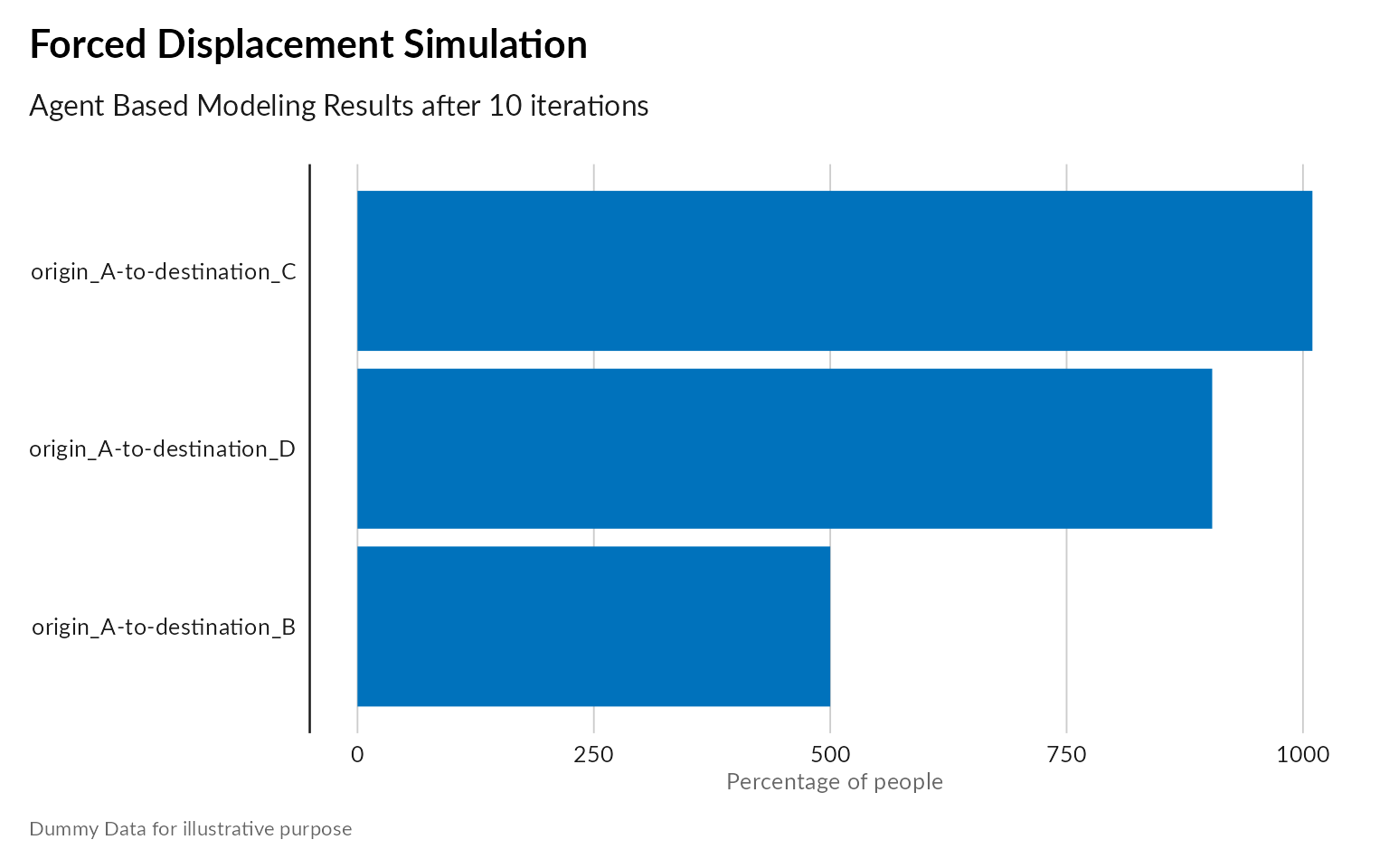
# Filter the results down to just the last day
ggplot(agent_data |>
         dplyr::group_by(country_history,  step) |>
         dplyr::summarise ( n = dplyr::n())) +
  aes(x =  step ,  y = n, group = country_history,  color = country_history) +
  geom_line( size=2 ) +
  scale_colour_viridis_d("Displacement", option = "plasma") +
  scale_x_continuous(  labels = scales::label_number(accuracy =1, scale_cut = scales::cut_short_scale())) +
  labs(
    title = "Simulation Convergence: Population Displacement",
    subtitle = paste0("Agent Based Modeling Results"),
    caption = "Dummy Data for illustrative purpose",
    x = "Simulation Steps"  ) +
  unhcrthemes::theme_unhcr(grid = "Y", axis = "X", axis_title = "X")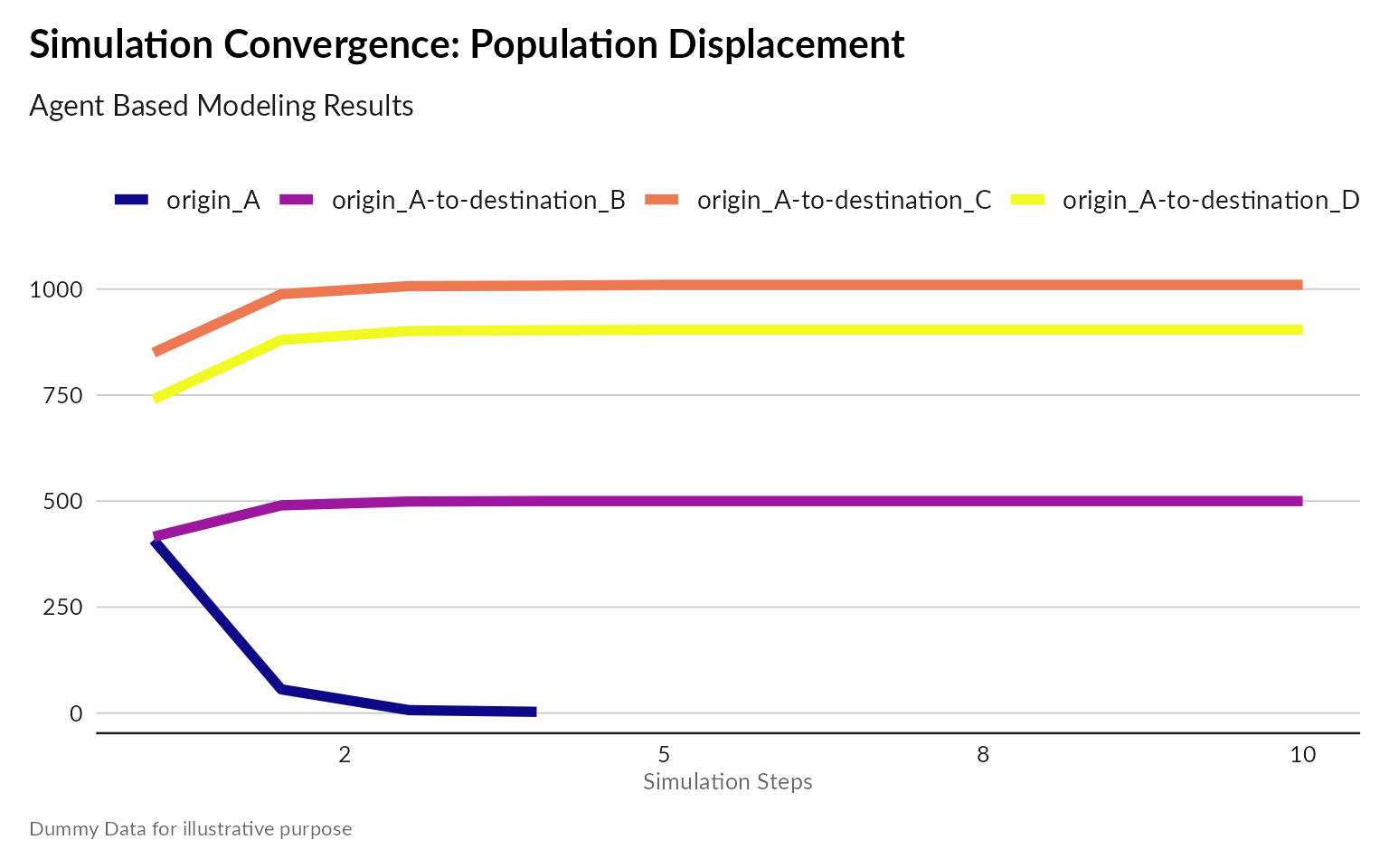
Conclusion: Model Validation
Validation is crucial to ensure the credibility and reliability of an Agent-Based Model (ABM) for forced displacement. This process involves comparing the model’s outputs with real-world data and expert assessments to confirm its accuracy and realism.
- Demographic Data: Demographic data from censuses or surveys can be instrumental in validating the model. For instance, population distributions, age structures, and family compositions from affected areas can be compared with the model’s output to ensure it accurately reflects the demographic characteristics of the displaced population.
Example: If the model predicts that 30% of displaced individuals are children, this percentage should align with data from similar past displacement events.
- Humanitarian Reports: Reports from humanitarian organizations provide detailed accounts of displacement events, resource availability, and the conditions of displaced populations. These reports can be used to check the model’s predictions about resource needs and movement patterns.
Example: If a humanitarian report indicates that access to education was a critical issue during a displacement event, the model should similarly reflect resource depletion in areas with high concentrations of displaced individuals.
- Research on Displacement Behavior: Academic and field research on displacement behaviors and decision-making processes offers valuable insights into why and how people move during crises. This research can be used to validate the rules and behaviors encoded in the model.
Example: Studies showing that individuals prefer migrating to areas with existing social networks can be used to verify that the model accurately simulates this behavior.
- Historical Displacement Patterns: Comparing the model’s outputs with historical displacement patterns from similar events helps validate its predictive power. The model should be able to replicate known outcomes of past displacement scenarios.
Example: If historical data show that most displaced persons from Country A moved to the nearest Country B, the model should produce similar migration patterns under equivalent conditions.
- Expert Assessment: Engaging experts in forced displacement research allows for an evaluation of the model’s behavioral realism. Experts can provide feedback on whether the model’s assumptions, rules, and outputs are plausible and consistent with real-world observations.
Example: Experts might assess whether the model’s depiction of migration decision-making under different levels of threat is realistic.
- Sensitivity Analysis: Conducting sensitivity analysis involves varying the model’s parameters to see how changes affect the outputs. This helps identify which parameters are most influential and ensures that the model’s predictions are robust across a range of scenarios.
Example: By altering parameters such as safety perception or resource availability, analysts can determine if the model consistently predicts higher migration rates when safety decreases or resources become scarce.
Annex: References
Using ABM in Migration and Forced Displacement Studies is not new. The literature review below is not exhaustive but can provide a first good overview:
Decision-Making in Agent-Based Models of Migration: State of the Art and Challenges
Principles and State of the Art of Agent-Based Migration Modelling
Agent-based modeling for migration and modern slavery research: a systematic review
A generalized simulation development approach for predicting refugee destinations
Agent-based models to inform economic policies on migration (ABM2Policy)
On Syria:
Prediction of Migration Paths Using Agent-Based Simulation Modeling: The Case of Syria
An Agent-Based Model to Identify Migration Pathways of Refugees: The Case of Syria
The Mobility of Displaced Syrians - An Economic and Social Analysis
On Ukraine:
An agent-based framework to study forced migration: A case study of Ukraine
Network Agency: An Agent-based Model of Forced Migration from Ukraine
On Democratic Republic of Congo: